
The idea behind the “Private Number” feature on iPhones and other cellular mobile devices, is to prevent the caller’s identity from being divulged in times when they choose to be clandestine. However, there are times you may desire to disable the feature.
Sometimes this feature may have be enabled accidentally, or you have enabled it and forgot how to where to find the disable switch. Which ever the scenaro, the solution is for you to learn how to remove / disable private number on iPhone and that’s what this article is hinged on, as we will run you through a comprehensive tutorial on the needed steps.
Steps To Remove Private Number On iPhone
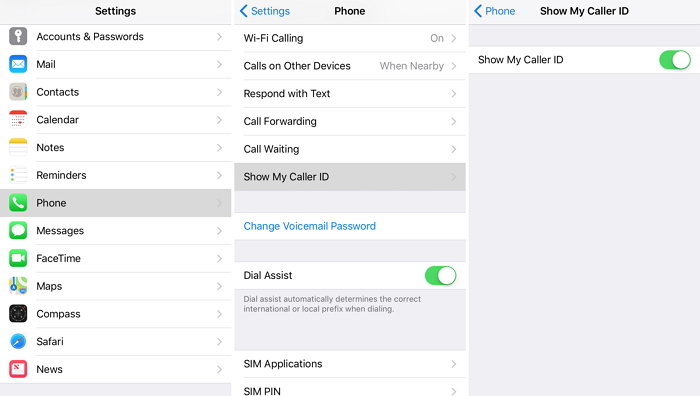
- Open your settings app on your iPhone
- Scroll down and click on the phone tab
- Next enter the “Show My Caller ID” tab
- Toggle Caller ID to enable it, which in turn stop your caller ID from being on
Also Read: Best Free Dating platforms / Apps For Singles In Nigeria
Having gone through the steps in the listed order, you can go ahead to confirm it’s efficacy by trying to call someone close to you, to see if it will display the “Private Number” tag on their cellular device. If it doesn’t then it means it went through. However, if it the “Private Number” tag still appears, then you probably should reach out to your telecom service provider.
Wrapping up: There you have it – a comprehensive tutorial on how to remove private number on iPhone. If you have any contribution, feel free to drop them in the comment section below.
Other Recommended Articles:

